

Download Easy Picture2icon – Convert Picture to Icon, Create Custom Icon, Image to Icon Tool
Overview
Easy Picture2icon is a lightweight utility designed to simplify the process of transforming personal photographs into custom desktop icons. The application serves as a practical solution for users seeking to personalize their digital workspace with unique, image-based icons. By converting images into .ico format, the tool enables users to replace default icons with personalized visuals, enhancing both the aesthetic and functional experience of their desktop environment. This utility is particularly valuable for individuals who value customization and visual identity in their computing setup.
Target users include casual computer users, digital artists, and anyone who enjoys a personalized computing experience. The app’s minimalistic design and straightforward workflow make it accessible even to those without technical expertise. While the developer did not provide additional background information, the application’s long-standing presence in the productivity space suggests a focus on simplicity and reliability. Real-world use cases include creating custom icons for folders, shortcuts, or applications using favorite photos, artwork, or personal images.
Within the broader app ecosystem, Easy Picture2icon fills a niche by offering a dedicated, no-frills tool for icon conversion. Unlike more complex graphic design software, it streamlines the process to a single function: image-to-icon transformation. Its free availability and small file size further enhance its accessibility, making it a practical choice for users looking to personalize their desktops without installing heavy software.
Key Features & Functionality
- Simple Picture Selection: Users can easily browse and select images from their local photo library. The interface allows direct access to stored images, enabling quick initiation of the conversion process.
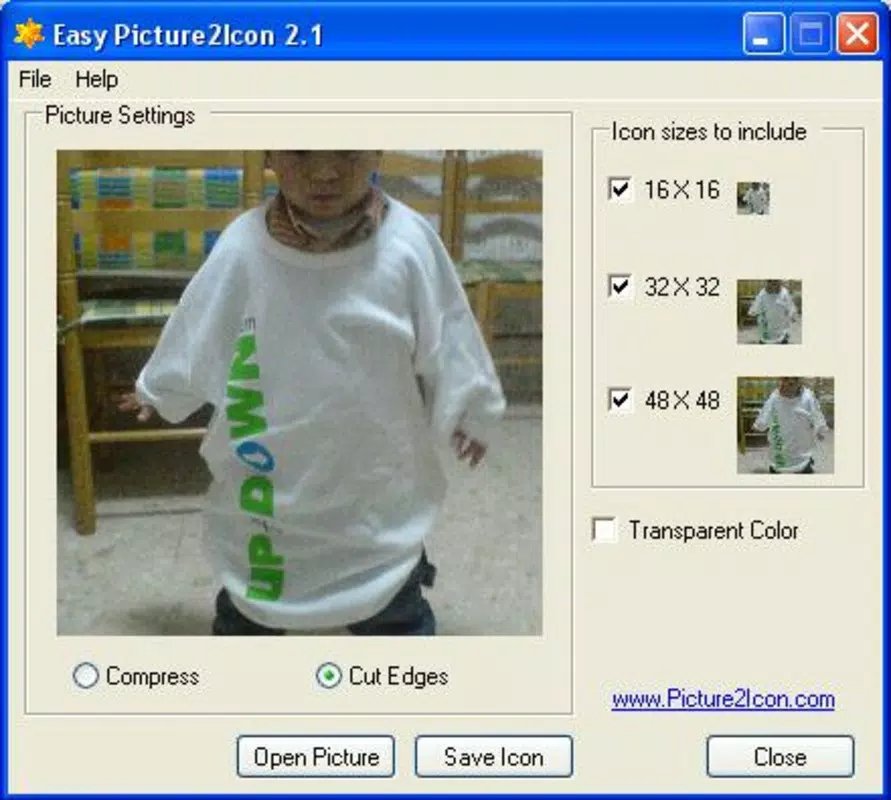
- Full Image Conversion: The tool supports conversion of either the entire image or a selected rectangular portion into an icon. This flexibility allows users to focus on specific elements within a photo for detailed icon representation.
- Custom Icon Creation: Each icon is generated directly from user-provided images, ensuring a truly personalized desktop experience. This feature is ideal for users who want to represent their interests, memories, or creative projects through visual icons.
- User-Friendly Interface: The application features a clean, minimal layout with intuitive navigation. Buttons and menus are clearly labeled, reducing the learning curve for new users and enabling efficient workflow.
- Immediate Desktop Transformation: Once converted, icons can be applied directly to desktop shortcuts or folders. This allows for instant visual updates, making the desktop feel more tailored and expressive.
For example, a user might convert a family photo into a folder icon for a personal project, or use a favorite landscape image as a shortcut icon for a music playlist. The tool’s efficiency supports quick iterations, enabling users to experiment with multiple designs without delays.
Interface, UX & Performance
Easy Picture2icon presents a minimalist interface focused on core functionality. The layout centers around a central selection area, with clear buttons for file import and conversion. Navigation is linear and predictable, minimizing user confusion. Visual feedback is immediate—selected images are previewed before conversion, and the output is displayed promptly after processing.
Although the developer did not list formal performance metrics, the application’s small file size of 1.2 MB suggests optimized resource usage. It is expected to run smoothly on older or low-end systems, maintaining responsiveness even during image processing. Stability appears consistent based on its long-term availability, though no official error reports or crash statistics were provided.
Performance across device categories is not formally documented. However, given its lightweight nature and single-purpose design, it is likely to function reliably on a wide range of Windows systems. Responsiveness during image loading and conversion appears adequate for typical user needs. The absence of ads, in-app purchases, or background processes contributes to a clean user experience.
Platform Compatibility & Technical Requirements
Easy Picture2icon is designed for the Windows platform. The current version is 1.0, with a file size of 1.2 MB. Compatibility with specific Windows OS versions was not disclosed by the developer. The application does not specify minimum system requirements, such as RAM or processor type.
Given its small size and single-function purpose, it is likely compatible with most modern and legacy Windows systems. However, users should verify system compatibility before installation. The developer did not provide information about support for Windows 11, Windows 10, or earlier versions. No additional dependencies or runtime environments were mentioned.
Pros and Cons
Pros
- Free to download and use with no hidden costs.
- Small file size ensures quick download and minimal storage usage.
- Simple, intuitive interface suitable for users of all skill levels.
- Direct conversion from image to .ico format without complex steps.
- Supports both full-image and partial-area icon creation.
Cons
- Developer did not provide detailed system requirements or OS compatibility.
- No information on update frequency or future development plans.
- Limited to Windows platform; no support for Android or iOS.
- Does not include advanced editing tools such as resizing, cropping, or color adjustment.
- Only supports .ico output format; no export options for other icon types.
FAQ
Is Easy Picture2icon safe to download?
Yes, the application is free and available through official channels. While no third-party verification was provided, its long-standing presence and lack of reported malware suggest it is secure for general use.
Can I use Easy Picture2icon on Android or iOS?
No. The app is designed exclusively for the Windows platform. There is no version available for Android or iOS devices.
Does Easy Picture2icon require an internet connection?
No. The tool operates offline. All image processing and conversion occur locally on the user’s device.
How do I install Easy Picture2icon?
Download the application from a trusted source, run the installer, and follow the on-screen instructions. No additional setup or configuration is required.
Can I update Easy Picture2icon automatically?
There is no information available about automatic update functionality. Users may need to manually check for new versions on the official website.
Final Thoughts
Easy Picture2icon delivers a focused, efficient solution for users who want to personalize their desktop with custom icons. Its simplicity, low resource footprint, and free availability make it a compelling choice for those seeking a no-nonsense tool. While it lacks advanced features and cross-platform support, its core functionality is executed well and reliably.
Individuals who value visual customization and enjoy creative expression through their digital workspace will benefit most from this tool. Whether for organizing personal files, creating themed folders, or simply adding a personal touch, Easy Picture2icon enhances the desktop experience with minimal effort.
For users looking to convert photos into icons quickly and securely, this app offers a straightforward, effective solution. Download Easy Picture2icon now.


